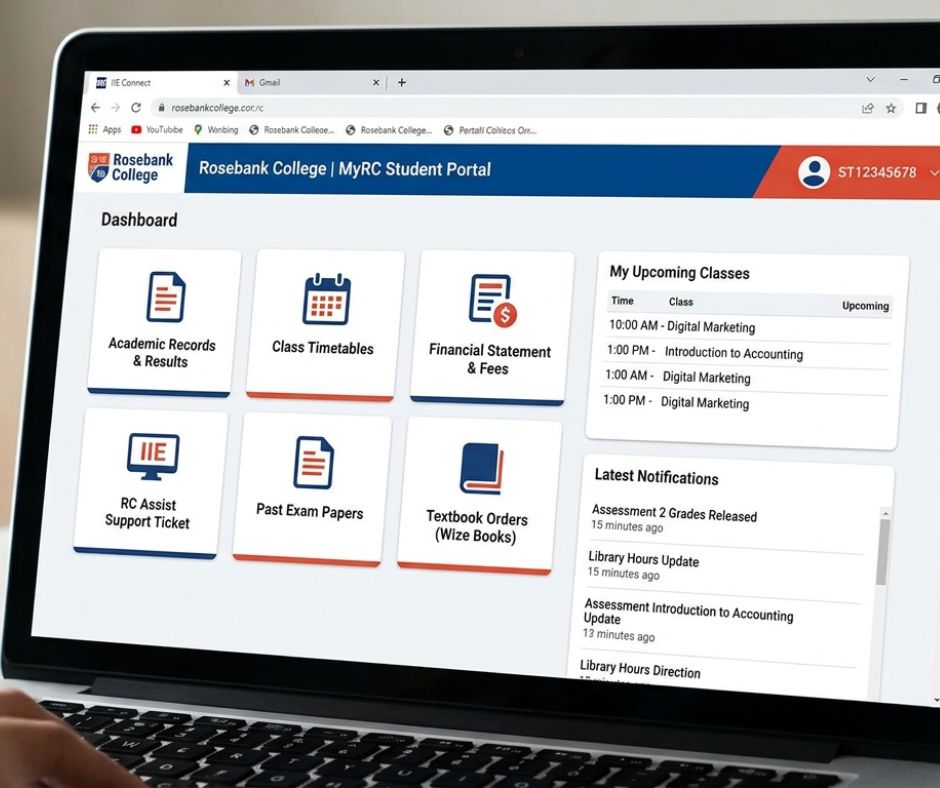
The Rosebank College Current Student Portal isn’t just one link; it’s a cluster of specialized platforms depending on whether you need to check your grades, log a tech issue, or access your learning materials.
Every enrolled IIE Rosebank College student accesses academic life through four interconnected platforms: RC Learn, RCConnect, MyRC, and RC Assist.
This guide covers login procedures, platform functions, troubleshooting, registration, results, funding, and campus-specific support.
Table of Contents
Platform Quick Links — Rosebank College Current Student Access
Direct portal access for all IIE Rosebank College current students:
| Platform | URL | Primary Function |
|---|---|---|
| RC Learn | rclearn.rosebankcollege.co.za | LMS — course content, assignments, grades |
| RCConnect | rcconnect.rosebankcollege.co.za | Communication — student email, campus notices |
| MyRC | sync.rosebankcollege.co.za | Dashboard — timetable, announcements, account |
| RC Assist | portal.rosebankcollege.co.za/assist/student-hub/ | Support — tickets, appeals, records, services |
| SharePoint | Accessed via Microsoft 365 login | Faculty documents, shared academic resources |
These five platforms form the complete digital infrastructure for every registered Rosebank College current student across the Braamfontein, Pretoria, Durban, Cape Town, and Bloemfontein campuses.
RC Learn vs RCConnect vs MyRC — What Each Rosebank College Platform Does
RC Learn, RCConnect, and MyRC are three separate platforms with distinct functions. RC Learn manages academic coursework. RCConnect handles institutional communication. MyRC provides a centralised student dashboard for timetables and campus updates.
Students who log into the wrong platform waste time and miss critical academic deadlines. The three platforms are not interchangeable. Each addresses a different dimension of the student experience.
Platform Comparison Table
| Platform | Core Function | What You Do Here | Credential Type |
|---|---|---|---|
| RC Learn | Learning Management System (LMS) | Access modules, submit assignments, view grades, communicate with lecturers | Student number + portal password |
| RCConnect | Communication portal (Microsoft 365) | Read student email, receive campus notices, access Outlook | Microsoft 365 student credentials |
| MyRC | Student dashboard | View timetable, campus-specific announcements, manage account sync | Student number + portal password |
| RC Assist | Student services hub | Log support tickets, submit appeals, request academic records | Student number + portal password |
| SharePoint | Document repository | Access faculty-shared resources, institutional documents | Microsoft 365 student credentials |
RC Learn — The Learning Management System
RC Learn is Rosebank College’s primary LMS, built on a structured course-module architecture. Every enrolled student has an RC Learn account tied to their registered modules for that semester. Within RC Learn, students access lecture materials, downloadable resources, assignment submission portals, grade books, and lecturer communication channels.
RC Learn is not a communication tool for institutional announcements. Campus notices, registration updates, and administrative messages are not delivered through RC Learn.
Assignment submission on RC Learn follows a specific submission flow: navigate to the relevant module, open the Assessment tab, select the active assignment, upload the required file type (PDF, DOCX, or specified format), and confirm submission. A submission confirmation screen and timestamp confirm receipt. Students who do not receive a confirmation should resubmit or contact their lecturer directly through the RC Learn messaging function.
RCConnect — Institutional Communication via Microsoft 365
RCConnect operates on Microsoft 365 and functions as the primary communication channel between IIE Rosebank College and its students. Every registered student receives a Microsoft Outlook email address through RCConnect, formatted as studentnumber@rcconnect.ac.za (verify the exact format with your campus IT desk, as formatting has varied across intake years).
RCConnect is not an academic platform. Course materials, assignment briefs, and grade notifications are not housed here. Its function is institutional: fee notices, registration confirmations, campus closures, academic calendar updates, and direct correspondence with the Registrar’s office arrive through RCConnect.
RCConnect also integrates with Microsoft Teams and OneDrive where faculty have enabled these features, supporting collaborative assignments and document sharing.
MyRC — The Centralised Student Dashboard
MyRC, accessible at sync.rosebankcollege.co.za, functions as the master entry point for campus-level student information. Timetables, campus-specific announcements, and account synchronisation are managed through MyRC. Students who cannot locate their class schedule should check MyRC before contacting the campus.
MyRC is not a learning platform and does not host course materials.
How to Log Into the Rosebank College Current Student Portal — Step by Step
To log in to the Rosebank College student portal, navigate to the relevant platform URL, enter your student number as your username, use your assigned or updated password, and complete any multi-factor authentication prompt.
First-time login and returning student login follow different procedures. Use the correct sequence to avoid account lockouts.
First-Time Login — New Rosebank College Current Students
New students receive a student number upon confirmed registration. This number serves as your username across RC Learn, MyRC, and RC Assist.
Follow these steps in sequence:
- Navigate to rclearn.rosebankcollege.co.za (for RC Learn) or sync.rosebankcollege.co.za (for MyRC).
- Enter your student number in the username field — do not include spaces or special characters.
- Enter the default temporary password provided in your registration confirmation email (sent to your personal email address at registration).
- The system will prompt you to create a new password on first login. The new password must meet the specified complexity requirements: minimum 8 characters, at least 1 uppercase letter, 1 number, and 1 special character.
- If Microsoft Authenticator is prompted, install the Microsoft Authenticator app on your mobile device, scan the QR code displayed on screen, and complete the verification.
- Upon successful authentication, you will land on your RC Learn dashboard or MyRC home screen.
Do not share your student number and password combination. Portal access is individual and tied to your academic record.
Returning Student Login
Returning students — those re-registering for a new semester or academic year — use the same student number and the password last set during active enrollment. However, portal access is subject to fee clearance. If your account shows a blocked status, the cause is a fee balance rather than a credential error.
If your password stopped working over a semester break, use the self-service password reset function (see Password Reset section below) before contacting IT support.
Returning students do not receive a new student number. Your original student number remains valid for the duration of your studies at IIE Rosebank College.
Logging In on Mobile — Browser-Based Access for SA Students
South African mobile usage data from Statcounter (2024) shows that approximately 72% of South African internet users access the web primarily via mobile devices. All Rosebank College student platforms are browser-accessible on mobile without requiring a dedicated app.
For reliable mobile access, use the following:
- Recommended browser: Google Chrome (Android) or Safari (iOS) — both render the RC Learn and MyRC interfaces without significant display issues.
- Data-saving tip: Enable Chrome’s Lite Mode or request a Desktop Site version if the mobile interface does not load assignment upload functions correctly.
- RC Learn on mobile: Full functionality is available via browser. The assignment submission interface may require file selection from cloud storage (Google Drive, OneDrive) rather than direct device storage on some Android configurations.
- Microsoft Outlook (RCConnect) on mobile: Install the Microsoft Outlook app from the Google Play Store or Apple App Store and sign in with your RCConnect Microsoft 365 credentials.
There is no standalone Rosebank College mobile app as of January 2026. All platform access is browser-based unless a specific Microsoft 365 app (Outlook, Teams) has been enabled by the faculty.
How to Reset Your Rosebank College Student Password
To reset your Rosebank College student portal password, use the “Forgot Password” function on the login page of the relevant platform. You will need access to your registered email address or your linked Microsoft Authenticator to complete verification.
Password reset is one of the most frequently needed but least documented student services. Students typically encounter password issues after semester breaks, after initial setup was skipped, or when Microsoft 365 enforces a password expiry cycle.
Self-Service Password Reset — Step by Step
- Navigate to the login page of the platform where access has failed (rclearn.rosebankcollege.co.za or sync.rosebankcollege.co.za).
- Select the “Forgot Password” or “Can’t access your account?” link below the login fields.
- Enter your student number or registered Microsoft 365 email address.
- Choose your verification method: email to your personal address, SMS to your registered number, or Microsoft Authenticator approval.
- Complete the verification step.
- Create a new password that meets complexity requirements (8+ characters, 1 uppercase, 1 number, 1 special character).
- Return to the login page and sign in with the new password.
Note: RCConnect / Microsoft 365 credentials and RC Learn credentials may be separate depending on your registration year and campus configuration. If resetting the Microsoft 365 password does not restore RC Learn access, reset credentials on the RC Learn platform separately.
Contact IT Support If Self-Reset Fails
If self-service reset does not restore access within 24 hours, log a ticket through RC Assist at portal.rosebankcollege.co.za/assist/student-hub/ using the IT Support category. Include your student number, the platform affected, and the error message displayed (screenshot recommended). RC Online Support is also reachable by phone and WhatsApp — contact details are available at rosebankcollege.co.za/contact-us/rc-online/.
Rosebank College Student Email — Outlook Setup Guide
Every registered Rosebank College current student receives a Microsoft Outlook email address through RCConnect, powered by Microsoft 365. This email address is the official channel for all institutional communication from IIE Rosebank College.
How to Find Your Rosebank College Student Email Address
Your student email address is confirmed in your registration documentation. It is formatted using your student number and the institutional domain (rcconnect.ac.za or a campus-specific variant). If you cannot locate your address, log into RCConnect directly — your email address appears in the account profile section.
How to Set Up RC Student Email on Your Phone
Android:
- Open the Google Play Store and install the Microsoft Outlook app.
- Open Outlook and select “Add Account.”
- Enter your full RCConnect student email address.
- Select “Office 365” or “Work or School Account” when prompted for account type.
- Enter your Microsoft 365 password and complete the MFA prompt if required.
- Allow Outlook to sync. Use Wi-Fi for the initial sync to avoid consuming mobile data — the initial mailbox download can exceed 50 MB if prior emails are present.
iOS:
- Open the App Store and install the Microsoft Outlook app.
- Follow the same steps as Android from step 2 above.
Alternatively, use the iOS Mail app with manual configuration: Account Type → Exchange, Server → outlook.office365.com, Domain → leave blank, Username → full student email address.
SharePoint Access
SharePoint is accessible through your Microsoft 365 login. Navigate to office.com, sign in with your RCConnect credentials, and select SharePoint from the app launcher. Faculty-shared resources, institutional documents, and collaborative project folders are housed here where faculty have configured sharing.
Rosebank College Timetable — How to Find Your Class Schedule in 2026
Timetables for all Rosebank College current students are accessible through MyRC at sync.rosebankcollege.co.za. Log in with your student credentials, navigate to the Timetable section, and filter by your registered campus and faculty.
Timetable Not Showing — What to Do
If your timetable is absent or incomplete after logging into MyRC, the most common causes are:
- Registration is incomplete or pending financial clearance.
- Module registration has not yet been processed by the Registrar.
- A campus-specific timetable publication delay at the start of the semester.
Log a timetable query through RC Assist under the Timetable Query ticket category. Include your student number, registered modules, and campus. Do not wait more than 48 hours into the semester before logging the ticket — late timetable access results in missed class attendance, which carries academic consequences under IIE attendance policy.
Rosebank College Academic Calendar 2026— Key Dates
The following dates reflect the 2026 IIE Rosebank College academic calendar. Verify current dates directly with your campus or through MyRC, as calendar updates are published through official institutional channels.
| Event | Approximate Period |
|---|---|
| Semester 1 registration | January 2026 |
| Semester 1 classes commence | Late January / early February 2026 |
| Mid-semester assessment period | March 2026 |
| Semester 1 end | June 2026 |
| Semester 1 examination period | June 2026 |
| Semester 1 results release | July 2026 |
| Semester 2 registration | July 2026 |
| Semester 2 classes commence | July / August 2026 |
| Mid-semester assessment period | September 2026 |
| Semester 2 end | November 2026 |
| Semester 2 examination period | November 2026 |
| Graduation ceremonies | November / December 2026 |
This calendar is provided as a reference framework. Specific dates are confirmed via MyRC and official campus communications. Always cross-reference with your campus’s Published Assessment Schedule (PAS), which governs submission deadlines and test windows per faculty.
How to Check Your Results as a Rosebank College Current Student
Results for IIE Rosebank College students are accessible through RC Learn’s grade book and through RC Assist for formal academic record requests. Results are not published through MyRC or RCConnect.
Where Results Appear
Module-level results — including assignment marks, test scores, and final examination marks — appear in the RC Learn grade book under the relevant module. Navigate to RC Learn, select the module, and open the Grades or Results tab.
Formal academic records, including transcripts and certificates of completion, are requested through RC Assist under the Academic Records ticket category. Processing times for formal records vary — allow a minimum of 5 to 10 working days for standard requests.
Results Missing or Incorrect — How to Appeal
If a result is absent or appears incorrect, follow this sequence:
- Allow 48 to 72 hours after the official results release date before assuming an error — system-wide uploads occur in batches.
- If results remain absent after 72 hours, log an RC Assist ticket under the Assessment Appeals category.
- Assessment appeals are time-sensitive. IIE policy specifies a defined appeal window, typically within 5 to 10 working days of results publication. Appeals submitted outside this window are not considered.
- Include your student number, module name and code, assessment name, date of submission or assessment, and the result query or discrepancy in the ticket.
Results for supplementary assessments, deferred assessments, and dean’s exams are published separately from main-semester results. These appear in RC Learn under the relevant module once processed.
Rosebank College Current Student Registration
Re-registration at Rosebank College is completed through the student portal and requires financial clearance before academic access is restored. Returning students cannot access RC Learn, MyRC, or RC Assist course functions until the current semester’s fees are cleared.
Re-Registration for Returning Students
Returning students re-register each semester or academic year to confirm continued enrollment. Registration requires:
- Confirmation of the qualification and modules for the upcoming period.
- Proof of fee payment or an approved payment arrangement with the Finance department.
- Completion of the registration form through the student portal within the published registration window.
Registration windows open before the semester start date and close within the first week of classes. Students who miss the registration window must contact the Registrar through RC Assist to discuss late registration options — late registration is not guaranteed and may result in a gap semester.
Portal Blocked for Fees — What to Do
Portal access is suspended when an outstanding fee balance exists on the student account. This is a system-automated block and is not a technical error. To restore access:
- Contact the Finance department at your campus directly — contact details are on the campus page at rosebankcollege.co.za.
- Request a fee statement through RC Assist under the Finance Statement category.
- Submit proof of payment or negotiate a formal payment arrangement with the Finance team.
- Once Finance clears the account, portal access is restored — this typically takes 24 to 48 hours after payment confirmation.
A payment arrangement (debit order or installment plan) must be formally approved. Verbal or informal agreements are not reflected in the system and do not restore portal access.
NSFAS and Bursaries at Rosebank College — What Current Students Need to Know
Rosebank College does not accept NSFAS funding. IIE Rosebank College is a private higher education institution and is not listed as an approved NSFAS institution. Students enrolled at Rosebank College do not qualify for NSFAS bursaries or allowances.
This answer is frequently searched and infrequently answered directly on the Rosebank College website. Students who enrolled expecting NSFAS eligibility should immediately explore the alternative funding options below.
Alternative Funding Options for Rosebank College Students
| Funding Source | Type | Who Qualifies | How to Apply |
|---|---|---|---|
| ISFAP | Government bursary (private institutions) | South African students at accredited private institutions | isfap.org.za |
| Fundi | Student loan | All students — credit check required on parent or sponsor | fundi.co.za |
| Edu-loan | Education loan | Students with a qualifying co-signatory | edu-loan.co.za |
| SEFA | Small business and skills development funding | Qualifying students — limited to specific criteria | sefa.org.za |
| IIE Institutional Bursaries | Merit and need-based bursary | Enrolled IIE students | Apply via RC Assist — Financial Assistance category |
| Employer Bursaries | Sector-specific sponsorship | Students employed or sponsored by a qualifying employer | Via employer HR department |
| Bank Student Loans | Commercial loan | Students with a parent or guardian willing to act as surety | Standard Bank, FNB, Nedbank, Absa |
ISFAP (Ikusasa Student Financial Aid Programme) is the most structurally similar to NSFAS for private institution students. It covers tuition, accommodation, and living allowances for qualifying students. Applications open annually — check isfap.org.za for the 2026 application window.
How to Apply for Rosebank College Financial Assistance
Log a ticket through RC Assist at portal.rosebankcollege.co.za/assist/student-hub/ under the Financial Services category. Include your student number, qualification, current fee balance, and any supporting documentation (proof of income, previous academic results). The RC Financial Aid team will assess eligibility and advise on available institutional support.
Rosebank College Student Support — RC Assist and Wellness Services
RC Assist, accessible at portal.rosebankcollege.co.za/assist/student-hub/, is the centralised platform for all student service requests at IIE Rosebank College. Every formal query — from academic records to mental health referrals — is logged through this system.
RC Assist Ticket Categories
RC Assist organises student requests by category. Selecting the correct category accelerates response time. The main ticket categories are:
- Academic Records (transcripts, certificates of completion, proof of enrollment)
- Assessment Appeals (disputed marks, missing results)
- Condoned Absence (documented absence from assessments)
- Deferred Assessment (applying to write assessments at a later date)
- Dean’s Exam (qualifying for final opportunity assessments)
- Timetable Queries (missing timetable, module not reflecting)
- Transfer Requests (campus or qualification transfers)
- Certificate Reprints (replacement of issued documents)
- Graduation Confirmation (confirming completion for ceremony attendance)
- Financial Services (fee statements, payment arrangements, bursary queries)
- IT Support (portal access, password reset, platform errors)
- Wellness Referrals (counselling and mental health support)
Wellness and Mental Health Support
Each Rosebank College campus has registered counsellors available to enrolled students. Counselling sessions are confidential, consistent with the requirements of the Health Professions Act 56 of 1974 and the ethical guidelines of the Professional Board for Psychology.
All wellness content, services, and referrals on this page are subject to review by the registered counsellors at IIE Rosebank College. Students requiring mental health support should log a Wellness Referral ticket through RC Assist or contact their campus directly to book a session. Counselling is available to all current students at no additional cost.
RC Online Support — Contact Details
RC Online Support provides direct contact outside the RC Assist ticketing system:
- Phone: Available on the RC Online contact page at rosebankcollege.co.za/contact-us/rc-online/
- WhatsApp: Available on the same page — WhatsApp is the fastest route for urgent credential issues during registration periods
- Operating hours: Published at rosebankcollege.co.za/contact-us/rc-online/ — verify current hours as these are updated per semester
Response times through RC Assist typically range from 1 to 3 working days for non-urgent tickets. IT support and fee-related queries during registration peaks (late January and July) experience higher volumes and may take up to 5 working days.
Campus-Specific Portal Access — Braamfontein, Pretoria, Durban, Cape Town, Bloemfontein
All Rosebank College campuses use the same RC Learn, MyRC, and RC Assist URLs. Campus-specific differences apply to support contact details, timetable structures, and some administrative pathways.
Braamfontein Campus
Braamfontein is the primary IIE Rosebank College campus and houses the largest student population. Students at Braamfontein access all platforms via the standard URLs listed above. Campus-specific announcements are delivered through MyRC filtered to the Braamfontein campus.
Pretoria Campus
Portal access pathways are identical to those in Braamfontein. Campus-specific contacts for the Pretoria campus are published at rosebankcollege.co.za.
Durban Campus
Students at the Durban campus encountering campus-specific timetable discrepancies should log RC Assist tickets and specify “Durban Campus” in the ticket description to route correctly.
Cape Town and Bloemfontein Campuses
Cape Town and Bloemfontein campuses operate under the same digital infrastructure. Campus-specific support contacts are available on the respective campus pages at rosebankcollege.co.za.
Frequently Asked Questions — Rosebank College Current Students
What is the URL for the Rosebank College current student portal?
The primary URLs are: RC Learn at rclearn.rosebankcollege.co.za, MyRC at sync.rosebankcollege.co.za, and RC Assist at portal.rosebankcollege.co.za/assist/student-hub/. Use your student number and portal password to log in.
Is RCConnect the same as RC Learn?
No. RCConnect and RC Learn are separate platforms with different functions. RCConnect is the Microsoft 365-based communication portal used for student email and institutional notices. RC Learn is the LMS used for course content, assignment submission, and grade tracking. Logging into one does not grant access to the other — both require separate credential confirmation.
Why is my Rosebank College student portal not working?
The three most common causes of portal access failure are:
- Incorrect credentials — Use self-service password reset at the platform login page.
- Fee block — An outstanding balance on your student account automatically suspends portal access. Contact the Finance department.
- Platform downtime — During registration periods (January and July), platforms experience higher load. Check RC Online Support for downtime notifications.
If none of these apply, log an IT Support ticket through RC Assist.
How do I submit assignments on RC Learn?
Log in to RC Learn at rclearn.rosebankcollege.co.za. Select the relevant module from your dashboard. Navigate to the Assessment or Assignment tab. Open the active assignment, select the upload function, choose your file, and confirm submission. A submission confirmation message and timestamp must appear for the submission to be valid. If no confirmation appears, re-attempt the upload or contact your lecturer immediately before the deadline.
Can I access the Rosebank College portal on my phone?
Yes. All Rosebank College student platforms — RC Learn, MyRC, and RC Assist — are accessible via mobile browser. Use Google Chrome on Android or Safari on iOS. Microsoft Outlook (for RCConnect email) and Microsoft Teams are available as dedicated apps on both platforms from the Google Play Store and Apple App Store.
How do I get my Rosebank College academic record?
Request your academic record (transcript) through RC Assist at portal.rosebankcollege.co.za/assist/student-hub/ under the Academic Records ticket category. Include your student number, full name, and the purpose of the request. Processing typically takes 5 to 10 working days. Expedited requests may be available for graduation or employment purposes — specify the urgency in the ticket.
What email does Rosebank College give current students?
Every registered Rosebank College current student receives a Microsoft Outlook email address through the RCConnect platform, powered by Microsoft 365. The email address uses the rcconnect.ac.za domain. Access it at rcconnect.rosebankcollege.co.za or through the Microsoft Outlook app using your Microsoft 365 student credentials.
Related Resources for Rosebank College Current Students
Enrolled students at IIE Rosebank College can access the following official resources:
- Qualifications and Courses: rosebankcollege.co.za/qualifications/
- RC Online Support: rosebankcollege.co.za/contact-us/rc-online/
- RC Assist Student Hub: portal.rosebankcollege.co.za/assist/student-hub/
- MyRC Dashboard: sync.rosebankcollege.co.za
- RC Learn: rclearn.rosebankcollege.co.za
- IIE Postgraduate Diploma in Data Analytics: rosebankcollege.co.za/qualifications/iie-postgraduate-diploma-in-data-analytics/
Students who have completed their qualification and are seeking alumni services should contact the Registrar’s office through RC Assist. New applicants — those who have not yet enrolled — should access the applications portal at rosebankcollege.co.za/applications/ rather than the current student platforms listed on this page.